In the previous post we saw that an EKS cluster is split across two VPCs: an AWS-managed VPC that hosts the Kubernetes control plane, and a VPC you manage that hosts your worker nodes and other AWS infrastructure. This post explains how those two halves authenticate and talk to each other — and how to troubleshoot that path when things go wrong.
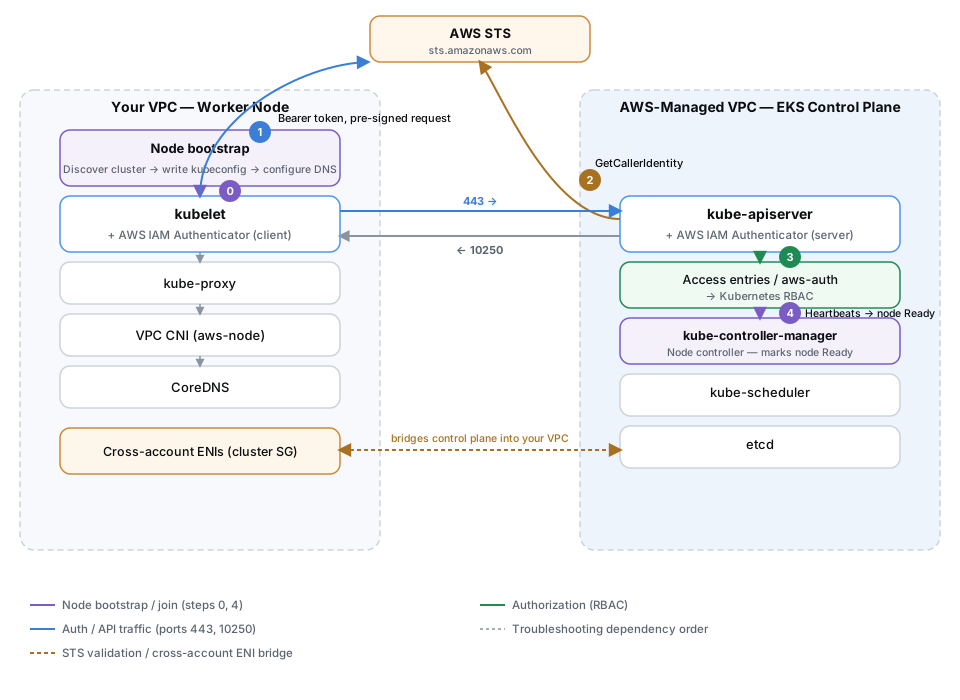
Step 0 above is the node bootstrap process covered in the previous post; steps 1–3 match the authentication flow in Step 1 below; the solid blue arrows are the ports covered in Step 2; the dashed amber arrow is the cross-account ENI bridge covered in Step 4 below; step 4 above is the kube-controller-manager's Node controller marking the node Ready once heartbeats begin, which the troubleshooting checklist at the end of this post starts from; the dashed grey arrows are that troubleshooting dependency order.
Step 1: Node Authentication
Before any meaningful communication happens, a worker node must authenticate itself to the API server. EKS uses AWS IAM identities for this, via the AWS IAM Authenticator.
The flow works like this:
- The kubelet uses the AWS IAM Authenticator client to generate a token. You can produce the same token manually with
aws eks get-token --cluster-name CLUSTER-NAME. - The client sends a pre-signed request carrying that token to the API server using the Bearer authentication method.
- The authenticator server validates the request by calling
sts.amazonaws.comwith theGetCallerIdentityAPI. This confirms the AWS identity behind the request. - At this point AWS IAM has confirmed who the caller is, but not what they can do inside the cluster. That authorization mapping is resolved by the cluster's access configuration. The modern, recommended mechanism is EKS access entries; the older
aws-authConfigMap is now deprecated. Clusters run in one of three access modes:API(access entries only),API_AND_CONFIG_MAP(both; the default for newly created clusters), orCONFIG_MAP(legacy).
For worker nodes specifically: with access entries, self-managed nodes use entries of type EC2_LINUX or EC2_WINDOWS (which grant the node the appropriate system:node/system:bootstrappers permissions), while managed node groups and Fargate profiles have their node-role access created and managed automatically by EKS — so you no longer need to edit aws-auth by hand to let nodes join.
So authentication answers "who are you?" via IAM and STS, while authorization ("what may you do?") is resolved through the cluster's access configuration and Kubernetes RBAC.
For background on the authentication model, see the managing access documentation.
Step 2: The Two-VPC Model and the Ports Involved
An EKS cluster spans two VPCs:
- AWS-managed VPC — Hosts the Kubernetes control plane.
- Customer-managed VPC — Hosts worker nodes and related AWS infrastructure such as load balancers.
Every worker node needs to reach the managed API server endpoint so it can register with the control plane and receive instructions to run pods. Regardless of how you configure endpoint access, two ports matter:
- Port 443 — kubelet → API server communication.
- Port 10250 — API server → kubelet communication (used by operations like
kubectl logsandkubectl exec).
The cluster security group
Since Kubernetes version 1.14, EKS automatically creates a cluster security group when you create a cluster. This eliminates the need to hand-build security group rules for control-plane-to-node communication. It permits communication between the EKS control plane and nodes in managed node groups.
AWS recommends attaching the cluster security group to all node groups, including self-managed (unmanaged) ones. If you prefer to use your own security groups for worker nodes, make sure they allow the required traffic to and from the EKS-managed network interfaces. See the cluster security group documentation and the EKS Best Practices networking guide.
Step 3: Endpoint Access Modes
EKS lets you control how the Kubernetes API server endpoint is reached. You can enable the public endpoint (default), the private endpoint, or both at the same time. This choice changes how DNS resolves and which path traffic takes.
For the underlying networking concepts, see Amazon's blog on demystifying cluster networking for EKS worker nodes and the cluster endpoint access documentation.
Public endpoint only (default)
- The cluster endpoint resolves to the public IP addresses of the NLB.
- Worker-node-to-API-server traffic egresses the VPC and reaches the API server through the NLB.
- API-server-to-node traffic (such as
kubectl logsorexec) flows through the EKS-managed network interfaces placed in your VPC. - A
kubectlrequest from your workstation resolves the public NLB IPs and is forwarded to the control plane.
Private endpoint only
- The cluster endpoint resolves to private IP addresses of the EKS-managed, cross-account elastic network interfaces (ENIs) that EKS provisions in your subnets — both from inside and outside the cluster.
- This private resolution is provided by a Route 53 private hosted zone that EKS creates automatically and associates with your cluster's VPC.
- All API traffic must originate from within the cluster VPC or a connected network (VPC peering, Transit Gateway, etc.).
- Worker nodes may live in the same VPC as the cluster or in another connected VPC.
Public and private endpoint
- From outside the cluster VPC, the API server endpoint resolves to the public NLB IPs — even over a peered VPC.
- From inside the cluster VPC, the same endpoint resolves to the private ENI IPs.
- In other words, where your
kubectlclient runs determines which path it uses to reach the API server.
A requirement for private access
For the private hosted zone to route correctly, the VPC must have both enableDnsHostnames and enableDnsSupport set to true, and the VPC's DHCP option set must include AmazonProvidedDNS in its list of domain name servers. See private cluster requirements.
Step 4: The EKS-Managed (Cross-Account) ENIs
When you create a cluster, EKS places elastic network interfaces in your subnets. These are commonly called cross-account ENIs because they are created and managed by the EKS service account on your behalf. They carry the cluster security group and are the path the control plane uses to reach your nodes for operations like kubectl exec and kubectl logs, and — with the private endpoint — the path nodes use to reach the API server.
If you use managed node groups, they share the same security group as these ENIs, which already allows nodes and the control plane to communicate. If you attach different security groups to your worker nodes, you must explicitly allow traffic from the EKS-managed ENIs (or from the security group attached to them).
Troubleshooting: Node-to-API-Server Timeouts
Connectivity from a node to the API server depends on three things: VPC DNS, control plane availability, and the network rules in between (security groups and network ACLs). When you see timeouts, work through the components in order.
1. Are nodes Ready?
Run kubectl get nodes. If all nodes have been Ready for several minutes, kubelet-to-API-server connectivity is healthy and you can stop here.
2. kubelet connectivity
If nodes are not ready, check:
- Control plane availability — Confirm the cluster is healthy and not throttled.
- Security groups / network ACLs — Ensure worker node subnets allow egress on 443 to the EKS-managed ENIs, and that the ENI security group allows ingress on 443 from the worker node subnets.
- VPC DNS — for a public cluster, the IPs resolved on the node should match what you resolve from outside; for a private cluster, the resolved IPs should match the private IPs of the EKS-managed ENIs.
Once this passes, you know VPC DNS on the node works, the control plane is reachable, and network policies are correct.
3. kube-proxy connectivity
kube-proxy uses host networking, so it relies on the same VPC DNS, control plane availability, and network rules as the kubelet. If the kubelet checklist passed, kube-proxy rarely fails at the TCP level. Verify with kubectl logs -n kube-system <kube-proxy-pod>, making sure you're testing a kube-proxy pod on a healthy node that uses the expected security group.
4. VPC CNI (aws-node) connectivity
The CNI relies on the KUBERNETES_SERVICE_HOST environment variable being present in the container, on kube-proxy having set up the correct iptables rules, and on the Kubernetes Service ClusterIP and Endpoints objects returning the correct ENI IPs.
Start with kubectl logs -n kube-system <aws-node-pod>. If that looks healthy, you can skip the rest. Otherwise, on the node you can confirm KUBERNETES_SERVICE_HOST is set inside the container (via ctr --namespace k8s.io containers info <container-id> for containerd), test reachability to the Kubernetes service ClusterIP on 443 with nc -v <cluster-ip> 443, confirm the Kubernetes Service and its Endpoints resolve to the expected ENI IPs with kubectl get svc and kubectl get ep, and review iptables rules using the Kubernetes service debugging guide.
In rare cases where KUBERNETES_SERVICE_HOST is missing, the CNI falls back to DNS, so CoreDNS becomes relevant — but the CNI logs usually make the problem clear.
5. CoreDNS
CoreDNS also relies on KUBERNETES_SERVICE_HOST and a functioning Kubernetes ClusterIP. If the CNI checklist passed, CoreDNS rarely fails to reach the API server at the TCP level. Check with kubectl logs -n kube-system <coredns-pod>.
Summary
Communication between the EKS control plane and worker nodes is an authenticated, network-gated path:
- Nodes authenticate using AWS IAM (token → pre-signed request → STS
GetCallerIdentity), with authorization resolved through the cluster's access configuration. - Traffic flows over well-known ports (443 to the API server, 10250 back to the kubelet), governed by the cluster security group and your network rules.
- Your endpoint access mode (public, private, or both) determines DNS resolution and the exact network path, with EKS-managed cross-account ENIs bridging the control plane into your VPC.
- When connectivity breaks, troubleshoot in layers — nodes
Ready, then kubelet, kube-proxy, VPC CNI, and CoreDNS — checking DNS, control plane health, and security group/ACL rules at each step.